Are you looking to create online courses and manage them efficiently? Open edX is an excellent platform to consider. In this blog post, we will explore how to create and manage courses in Open edX.
What is Open edX?
Open edX is an open-source online learning platform that allows you to create and deliver courses. It was developed by edX, a non-profit organization founded by Harvard and MIT. Open edX is used by many universities and organizations worldwide, including Harvard, MIT, Stanford, and Microsoft.
Why Choose Open edX?
Open edX offers many advantages over other online learning platforms. It is free, customizable, and scalable. You can create courses in any language, and it supports many different types of content, including videos, quizzes, and discussion forums. You can also track student progress and issue certificates upon completion.
How to Create a Course in Open edX?
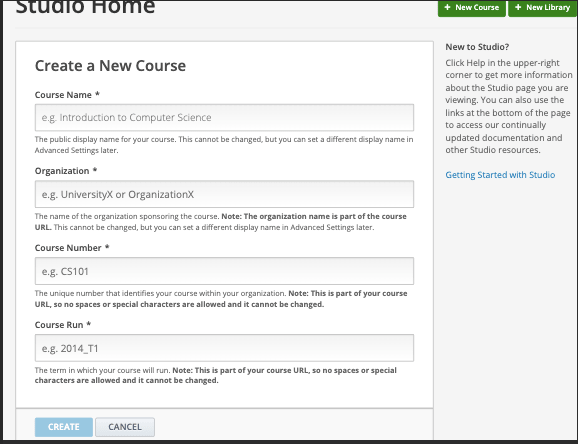
Creating a course in Open edX is easy. First, you need to create an account on the Open edX platform. Once you have done that, follow these steps:
- Click on the “Create a Course” button on the dashboard.
- Choose a course template, or create your own.
- Add course details, such as the course name, description, and image.
- Create course content, such as videos, quizzes, and discussion forums.
- Set up the course structure, such as the sequence of modules and sections.
- Publish the course.
How to Manage a Course in Open edX?
Managing a course in Open edX involves several tasks, such as creating and editing content, managing student enrollment, and tracking student progress. Here are some tips on how to manage a course in Open edX:
1. Create and Edit Content
Creating and editing content is easy in Open edX. You can use the built-in content authoring tools, or you can import content from other sources, such as YouTube or Vimeo. To edit content, simply click on the “Edit” button next to the content item.
2. Manage Student Enrollment
Managing student enrollment involves tasks such as adding and removing students, setting enrollment dates, and managing student groups. To manage student enrollment, go to the “Course Management” section of the course dashboard.
3. Track Student Progress
Tracking student progress is essential to ensure that students are making progress and to identify areas where they may be struggling. Open edX offers several tools to track student progress, such as progress tracking, gradebook, and student analytics.
Conclusion
Creating and managing courses in Open edX is easy and straightforward. With its many features and tools, Open edX is an excellent platform for online learning. Whether you are a teacher, instructor, or trainer, Open edX can help you create and deliver courses that engage and inspire your students. So why not give it a try today?

[…] How to Create and Manage Courses in Open edX? […]