Introduction
In the modern hyper-digital marketplace, a professional website development strategy functions as the primary engine for business scalability, brand credibility, and customer acquisition. Businesses operating without a highly optimized digital presence face severe operational friction—including invisible market presence, fragmented customer trust, declining conversion pipelines, and a complete vulnerability to agile competitors. This comprehensive business guide uncovers the exact technical architecture, user experience frameworks, platforms, and deployment workflows required to transform your web presence into an enterprise asset. As a premier authority in the content management system landscape, CMSGALAXY.COM provides the strategic insights and technical execution blueprints shared below to help startups, SMBs, and enterprise decision-makers navigate the complex complexities of modern web ecosystems.
What Is Professional Website Development?
Professional website development is the holistic engineering of a highly secure, performant, scalable, and user-centric web infrastructure aligned precisely with strategic business objectives. It goes far beyond aesthetic web design or assembling a generic template.
True professional development integrates multiple technical disciplines:
- Engineering Infrastructure: Writing clean, compliant, and standard-abiding code across front-end and back-end environments.
- Information Architecture: Structuring complex workflows so users can locate data instantly.
- Systems Integration: Connecting your customer-facing site directly to ERPs, CRMs, APIs, and payment systems.
- Lifecycle Engineering: Designing with long-term continuous integration, security patching, and platform scalability in mind.
Why Every Business Needs a Professional Website
Relying on legacy sales channels or social media algorithms leaves your enterprise exposed to sudden platform changes and market shifts. A dedicated, professionally built website gives you full control over your brand narrative, lead generation, and customer data.
Critical Industry Statistics and Performance Benchmarks
- First Impressions: It takes users less than 0.05 seconds (50 milliseconds) to form an opinion about your website, determining whether they stay or bounce.
- Mobile Supremacy: Over 58% of global web traffic originates from mobile devices. Google operates exclusively on mobile-first indexing, meaning non-responsive platforms are penalized in organic visibility.
- Speed and Revenue: A 1-second delay in page load times can reduce conversions by up to 7%, while sites loading within 2 seconds boast significantly higher retention rates.
- UX ROI: Every single dollar invested in user experience (UX) and intuitive user interface design yields an average return of up to $100—a massive 9,900% ROI.
Key Components of a Professional Business Website
To achieve maximum operational ROI, a professional business website must balance several overlapping core layers:
- Accessible UI/UX Design: High-contrast layouts, logical navigation hierarchies, and responsive grids that work on all screen sizes.
- Technical Optimization: Strict compliance with Core Web Vitals (LCP, INP, CLS) to ensure fast rendering.
- Enterprise Security Layers: End-to-end encryption protocols, secure user sessions, and regular vulnerability scanning.
- Conversion-Centered Architecture: Explicit Call-to-Action (CTA) elements, streamlined forms, and logical user journeys that turn visitors into customers.
Website Planning and Requirement Analysis
Skipping deep requirement analysis is a primary reason software projects run over budget. Before writing any code, a professional website development company must define your business workflows.
- User Personas: Defining exactly who your visitors are, what problems they face, and how they navigate digital spaces.
- Functional Specifications: Detailing specific platform behaviors, such as gated client portals, automated booking engines, or complex faceted search filters.
- Non-Functional Requirements: Setting hard targets for maximum concurrent traffic capacity, page load thresholds under variable networks, and regulatory compliance standards (such as GDPR, CCPA, and HIPAA).
Choosing the Right Website Platform
Selecting your base platform architecture dictates your technical agility, security posture, and long-term operating costs.
Website Builders vs. Professional Development
SaaS-based drag-and-drop website builders offer basic layouts for micro-businesses, but lack the technical flexibility needed for enterprise growth.
| Evaluation Metric | SaaS Website Builders (e.g., Wix, Squarespace) | Professional Development (Agency/Team) |
| Code Ownership | Proprietary infrastructure; zero data portability | 100% ownership of source code and databases |
| SEO Flexibility | Basic, locked metadata configurations | Advanced structural schema and server-side control |
| Integration Capabilities | Restricted to closed marketplace ecosystems | Universal third-party API and ERP integration |
Static vs. Dynamic Websites
- Static Websites: Serve pre-rendered HTML/CSS directly from a CDN. They offer fast load times and minimal server overhead, making them ideal for brochure websites or documentation portals.
- Dynamic Websites: Generate pages in real-time using database queries. They enable personalized user experiences, real-time membership dashboards, and complex transactional web applications.
CMS vs. Custom Website Development
Content Management Systems (CMS) leverage pre-built frameworks to speed up market deployment. Custom website development, by contrast, builds bespoke software architectures tailored precisely to your exact operational workflows.
| Structural Criteria | Content Management Systems (CMS) | Custom Website Development |
| Development Speed | Exceptionally fast deployment timelines | Extended engineering lifecycle |
| Upfront Financial Outlay | Lower initial development investment | Higher initial engineering cost |
| Scalability Limitations | Dependent on core architecture and plugin code | Unlimited scaling freedom |
| Security Surface Area | Vulnerable if plugins are left unpatched | Highly secure; minimal common vulnerabilities |
| Performance Control | Requires optimization to remove code bloat | Completely streamlined, high-performance code |
Website Design and User Experience (UX)
A professional presentation layer focuses on user psychology and intuitive interaction paths, not just trendy visuals.
- Information Architecture (IA): Creating a clean, logical map of your content so users can find key information within three clicks.
- Interaction Design: Implementing subtle visual cues, clear state changes, and intuitive forms that prevent user frustration.
- Visual Hierarchy: Using size, contrast, and spacing to guide the user’s eye naturally toward primary conversion actions.
Responsive and Mobile-First Development
With the majority of web traffic moving away from desktops, responsive web design is no longer optional; it is the industry benchmark.
- Fluid Grid Layouts: Designing layouts using relative units (like percentages or viewport units) rather than fixed pixels, allowing content to resize seamlessly.
- Flexible Media: Engineering images and video modules to scale proportionally within their structural containers without breaking layouts.
- Media Queries: Implementing specific breakpoint scripts to re-arrange, hide, or enhance user interface blocks based on the exact screen size of the device.
Technical Architecture: Front-End, Back-End, and Infrastructure
A professional digital product splits its technical workloads across three core layers to maximize performance and data integrity:
Front-End Development Technologies
This layer transforms design concepts into clean, interactive code using standard semantic tools:
- HTML5: Establishes semantic document models for search engines and assistive accessibility tools.
- CSS3 & Modern Utilities (e.g., Tailwind): Powers responsive layouts via robust layout engines.
- Modern JavaScript: Delivers seamless interface changes and handles complex client-side calculations.
Back-End Development Technologies
The back-end serves as the underlying engine managing your business logic, data calculations, and external system integrations. Developers rely on stable languages like PHP, Node.js, Python, or Go to route data securely between server resources and client interfaces.
Database and Server Infrastructure
This layer focuses on setting up optimized database systems using MySQL or PostgreSQL for structured data, or MongoDB for unstructured documents. These systems are backed by cloud hosting environments like AWS, Google Cloud, or Azure, and use advanced memory caches like Redis to minimize database strain during traffic surges.
Website Security Best Practices
An unsecured business website represents an existential threat to company operations, corporate reputation, and data integrity.
- Enforce Strict HTTPS/TLS: Encrypt data transmission between the user’s browser and your web server to prevent intercept attacks.
- Implement Web Application Firewalls (WAF): Deploy cloud security layers to monitor, filter, and block malicious HTTP traffic before it reaches your hosting infrastructure.
- Regular Patch Management: Ensure your core platforms, database configurations, and server scripts receive timely automated updates to eliminate known security flaws.
Website Performance Optimization
If your business platform fails to load immediately, users will abandon it to find a faster alternative.
- Next-Gen Media Optimization: Convert standard image files into advanced formats like WebP or AVIF to drastically reduce file sizes without sacrificing quality.
- Code Minification and Bundling: Strip unnecessary characters, white spaces, and developer comments from your HTML, CSS, and JS files to create streamlined asset packages.
- Edge Caching Networks (CDNs): Route static resources through global server networks like Cloudflare or CloudFront to serve pages from the geographic location closest to your visitor.
SEO-Friendly Website Development
True search engine optimization begins during the initial coding phase, long before content creators begin drafting articles.
- Semantic Markup Hierarchies: Use proper heading structures (H1 exclusively for titles, followed by structured H2 and H3 tags) so search engines understand your content’s layout.
- Structured Data Schema: Integrate custom JSON-LD schema scripts directly into the page source code, giving search crawlers precise context about your products, reviews, and business profile.
- Automated XML Sitemaps: Generate and link live, dynamic sitemaps to search consoles, ensuring newly published landing pages are indexed immediately.
Accessibility and User-Centric Design
Inclusive design extends your market reach to all users while protecting your enterprise from digital compliance legal issues.
- WCAG 2.1 Compliance: Build web structures that adhere to Web Content Accessibility Guidelines, focusing on color contrast, clear element labeling, and readable text sizes.
- Keyboard Navigation Support: Ensure every interactive component, form field, and navigation link can be operated using only a keyboard.
- Descriptive ARIA Attributes: Implement clear Accessible Rich Internet Applications labels within your markup to provide text descriptions for screen-reading devices.
E-commerce Website Development
Building a dependable e-commerce platform requires creating an effortless path from product discovery to secure checkout.
- Dynamic Inventory Synchronization: Implement real-time data pipelines linking your customer-facing digital storefront to warehouse management software, preventing accidental out-of-stock orders.
- Secure Payment Infrastructure: Integrate tokenized transaction systems via leading gateways like Stripe, PayPal, and Adyen, ensuring strict compliance with PCI-DSS data safety standards.
- Optimized Checkout Frameworks: Reduce cart abandonment through single-page checkouts, clear guest checkout pathways, automated shipping cost calculators, and real-time form validation.
Content Management Systems (CMS)
A professional CMS development workflow empowers non-technical marketing teams to manage content schedules without risking breaks to core system code.
- Decoupled & Headless Frameworks: Separating the back-end content database from the front-end presentation layer provides maximum development flexibility and high delivery speeds.
- Granular Access Control Policies: Assigning precise user permissions (such as Administrator, Editor, or Author) protects system configurations from accidental edits.
- Custom Content Taxonomies: Designing personalized content structures and data fields tailored to your specific industry products or digital assets.
Top Website Development Platforms and Technologies
WordPress
- Features: Open-source platform powering over 43% of all web properties, supported by an extensive plugin ecosystem.
- Benefits: Intuitive content editing workflows, lower development costs, and rapid deployment.
- Ideal Use Cases: Content marketing hubs, corporate websites, medium e-commerce platforms, and news portals.
- Limitations: Vulnerable to security risks if third-party modules are left unmaintained; prone to database slowdowns without proper optimization.
Drupal
- Features: An enterprise-grade PHP framework known for its granular user access control systems and robust data modeling capabilities.
- Benefits: Secure, natively multilingual, and built to handle complex content relationships.
- Ideal Use Cases: Government portals, large university networks, and enterprise-level multi-site networks.
- Limitations: Steep technical learning curve requiring specialized engineering talent.
Joomla
- Features: A versatile PHP content management system that bridges the gap between WordPress’s simplicity and Drupal’s structural complexity.
- Benefits: Strong built-in multi-lingual management and advanced content categorization right out of the box.
- Ideal Use Cases: Mid-market community portals, membership networks, and internal corporate intranets.
- Limitations: Smaller third-party developer marketplace compared to leading modern platforms.
Shopify
- Features: A fully managed, cloud-hosted SaaS platform optimized specifically for digital commerce operations.
- Benefits: Zero server maintenance overhead, reliable PCI-DSS compliance, and smooth checkout scaling during traffic spikes.
- Ideal Use Cases: Fast-growing Direct-to-Consumer (D2C) brands and omni-channel retail businesses.
- Limitations: Ongoing monthly subscription fees and transaction charges; restricted customization of core checkout steps on lower tiers.
Magento (Adobe Commerce)
- Features: A highly scalable, open-source e-commerce platform built for massive product catalogs and complex buying workflows.
- Benefits: Complete structural customization, robust multi-store management from a single interface, and powerful B2B features.
- Ideal Use Cases: Enterprise-scale retail operations, global multi-currency B2B environments, and complex multi-vendor marketplaces.
- Limitations: High hosting resource demands and significant development budgets required for maintenance.
Laravel
- Features: A robust, open-source PHP framework utilizing elegant MVC architecture design patterns.
- Benefits: Built-in tools for authentication, background task queues, secure routing, and database migrations.
- Ideal Use Cases: Custom web applications, internal business SaaS products, and custom business portals.
- Limitations: Requires complete bespoke UI construction; lacks standard out-of-the-box content editing interfaces.
React
- Features: A component-based JavaScript library maintained by Meta, designed for building rapid single-page applications.
- Benefits: Virtual DOM rendering delivers high execution speeds; modular components can be reused across different projects.
- Ideal Use Cases: High-performance single-page web apps (SPAs), dynamic customer dashboards, and interactive user platforms.
- Limitations: Requires server-side rendering setups (like Next.js) to ensure proper search engine indexability.
Angular
- Features: Google’s opinionated, TypeScript-based engineering platform for complex application design.
- Benefits: Strict architecture with two-way data binding guarantees code reliability across large engineering teams.
- Ideal Use Cases: Large-scale enterprise dashboards, secure banking systems, and complex single-page corporate tools.
- Limitations: Large initial bundle size and a steep technical ramp-up period for junior developers.
Node.js
- Features: A runtime environment that executes JavaScript code on the server side using the high-performance V8 engine.
- Benefits: Natively handles thousands of concurrent server tasks efficiently with an asynchronous, event-driven model.
- Ideal Use Cases: Real-time data dashboards, streaming systems, collaborative team spaces, and scalable microservice APIs.
- Limitations: Single-threaded design can create performance bottlenecks during long, CPU-intensive math calculations.
PHP
- Features: The server-side scripting language that runs the vast majority of modern web applications and top content platforms.
- Benefits: Broad native database support, cost-effective hosting options, and a massive global developer community.
- Ideal Use Cases: Modern dynamic business portals, traditional content websites, and custom API systems.
- Limitations: Poorly structured legacy codebases can lead to system maintenance issues if modern standards aren’t applied.
Comparison of Top CMS Ecosystems
| Core Feature Set | WordPress | Drupal | Joomla |
| Market Share Authority | Dominant (~43% of web) | Enterprise niche (~1.2%) | Stable mid-market (~1.8%) |
| Security Integrity | High risk if unpatched | Enterprise-grade baseline | Balanced, reliable core |
| Taxonomy Flexibility | Good via custom fields | Exceptional out-of-the-box | Structured and hierarchical |
| Development Velocity | Immediate to fast | Moderate to extended | Balanced deployment speed |
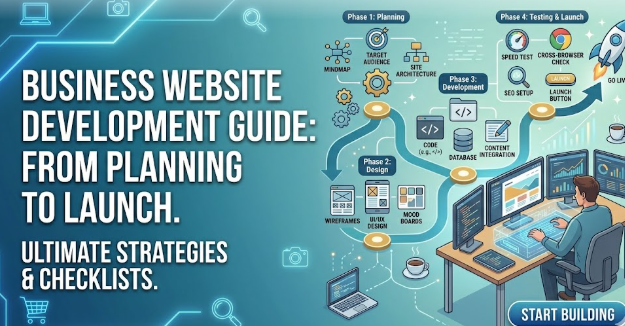
The Step-by-Step Professional Website Development Process
Developing an enterprise-grade digital product requires a structured, multi-phase lifecycle to minimize scope creep and keep teams aligned.
- Discovery Phase: Engineers and business stakeholders meet to define project goals, analyze competitor positions, identify the target audience, and set technical boundaries.
- Planning Phase: Teams establish content hierarchies, map out page architectures, and write detailed Technical Specification Documents (TSDs).
- Design Phase: Designers build wireframes, interactive user prototypes, and high-fidelity visual layouts that match your brand identity guidelines.
- Development Phase: Developers translate design mockups into working code, build custom database schemas, and integrate third-party APIs.
- Testing Phase: The quality assurance (QA) team runs cross-browser compatibility tests, automated security scans, load-bearing stress tests, and checks for accessibility compliance.
- Deployment Phase: The site is migrated to live production servers via secure automated CI/CD pipelines, complete with real-time CDN caching configurations.
- Maintenance Phase: The team provides continuous server monitoring, software security patching, user-behavior analysis, and regular iterative feature rollouts.
Website Maintenance and Support
A successful digital asset requires ongoing monitoring and updates long after its initial launch.
- Automated Backup Calendars: Configure daily or hourly server-level backups to off-site cloud storage nodes to guarantee rapid system recovery if critical errors occur.
- Real-Time Uptime Monitoring: Deploy continuous scanning scripts to alert system engineers immediately if hosting platforms face performance drops or unexpected downtime.
- Database Optimization Routines: Clean out expired cache data, optimize overhead tables, and clear out historical log files to maintain fast query response times.
Common Website Development Mistakes
- Using Pre-Made Themes and Bloated Plugins: Relying on heavy, poorly written third-party templates introduces excessive code weight, creates security vulnerabilities, and slows down your site’s performance.
- Neglecting Post-Launch Maintenance: Treating a development project as a one-time setup leads to outdated code, broken links, unpatched vulnerabilities, and eventual database degradation.
- Ignoring Analytics Data: Launching a web property without setting up proper user behavior tracking (like GA4) leaves you blind to drop-off points in your conversion funnel.
Best Practices for Business Website Success
Business Website Development Workflow Case Study
Consider a traditional B2B manufacturing firm struggling with low engagement metrics online. Their old platform used rigid, non-responsive tables and hidden PDF product specifications.
By executing a strategic website redesign focused on user experience (UX), the site was rebuilt on a mobile-first responsive grid. Key improvements included intuitive, faceted product searches, streamlined inquiry forms, and accessible design patterns. The results were immediate: mobile conversion metrics jumped by 140%, average session times increased significantly, and bounce rates dropped across their entire product line.
To mirror these results, ensure your project team prioritizes data-driven design changes, maintains strict testing environments before staging updates, and values clean functionality over unnecessary visual clutter.
Future Trends in Website Development
Keeping ahead of modern technological changes protects your digital platform from falling behind the competition.
- AIOps and Intelligent Personalization: Integrating AI modules directly into web frontends to tailor layout blocks and product paths based on real-time user behavior.
- Serverless and Edge Architectures: Moving application backend calculations away from single hosting servers and directly into global edge computing points to achieve nearly instant loading times.
- Voice and Conversational UX Optimization: Structuring data schemas and natural phrasing tags to match the growth of automated voice search and conversational AI systems.
How CMSGALAXY.COM Helps Businesses Build Professional Websites
As a trusted partner in digital transformation, CMSGALAXY.COM helps companies design, launch, and scale high-performance web properties tailored to their unique business objectives.
- Deep Content Platform Expertise: Crafting customized, secure instances of open-source platforms like WordPress, Drupal, and Joomla to match enterprise content workflows.
- Bespoke Web Application Development: Engineering custom, high-speed applications using modern tech stacks like Laravel, React, and Node.js for complex business systems.
- Conversion-Focused UI/UX Design: Building highly accessible, mobile-first interfaces grounded in user psychology to maximize customer engagement.
- Built-In SEO and Speed Engineering: Optimizing every line of code to ensure fast page loads, high core web vital scores, and strong organic search visibility.
- Proactive Maintenance and Support: Providing ongoing, round-the-clock server monitoring, security patching, and iterative feature updates to protect your digital investment.
Professional Website Development Checklist for Businesses
Phase 1: Pre-Development Foundations
- [ ] Document core business objectives and target user profiles.
- [ ] Secure ownership of domain names and set up scalable cloud hosting environments.
- [ ] Define the exact feature list and select your core platform architecture.
Phase 2: Design & Content Preparation
- [ ] Establish a responsive layout system optimized for mobile viewports.
- [ ] Create clear brand typography and color rules that meet accessibility standards.
- [ ] Produce optimized media assets and search-optimized copy for all primary pages.
Phase 3: Technical Execution & SEO
- [ ] Write clean, valid code that works seamlessly across all major browsers.
- [ ] Configure JSON-LD schema markup and structure heading tags correctly.
- [ ] Set up secure HTTPS protocols and configure server firewalls.
Phase 4: Launch Preparation & QA Testing
- [ ] Test all contact and inquiry forms to ensure data flows correctly into your CRM.
- [ ] Validate site speed performance across desktop and mobile devices.
- [ ] Verify error-free rendering on varying viewport sizes and operating systems.
Frequently Asked Questions (FAQs)
- What is the average timeline required to complete professional website development?
A basic corporate website built on an established content framework typically takes 4 to 8 weeks. Complex enterprise applications, bespoke custom systems, or large-scale e-commerce platforms can take anywhere from 3 to 6 months of dedicated design and engineering sprint cycles. - How does custom website development differ from modifying pre-built themes?
Custom development builds an optimal codebase from scratch tailored exactly to your business rules, maximizing speed and security. Pre-built themes use generic, catch-all code to fit as many layouts as possible, which adds unnecessary weight and slows down performance. - Why should a business avoid using cheap, automated website builders?
While SaaS builders are cost-effective for simple setups, they restrict your long-term growth. They lock you into their proprietary infrastructure, offer limited custom SEO control, make it difficult to migrate your data, and lack the capability to build complex third-party system integrations. - What specific factors influence the overall financial investment of a business website?
The total cost depends on your chosen platform architecture, the complexity of required feature integrations (like ERP or inventory links), the overall page count, custom animation needs, and whether you work with an independent developer or a full-service technical agency. - What is a Content Management System (CMS), and does my company need one?
A CMS is a software platform that lets your marketing team update text, imagery, and blog content via a visual editor without needing to write code. It is highly recommended for any business that updates its site regularly to support content marketing and campaign changes. - How does mobile responsiveness impact my brand’s organic search visibility?
Google uses mobile-first indexing, meaning its web crawler evaluates your mobile layout to determine search rankings. If your site is difficult to navigate or breaks on smartphones, your organic rankings will drop across all devices. - What steps should be taken to guarantee user data remains secure on our platform?
You should implement end-to-end TLS/HTTPS encryption, run regular automated malware scans, enforce strong password rules for admin accounts, use web application firewalls (WAF), and keep all underlying core software and plugins updated. - What are Google’s Core Web Vitals, and why should our development team care?
Core Web Vitals are real-world performance metrics measuring visual stability, loading speed, and interactivity. Google uses these scores as a direct ranking factor, making fast loading times essential for both user experience and SEO. - How often does a professional business web property require technical maintenance?
Security audits and software updates should be performed at least once a month. Server performance metrics, automated data backups, and security log reviews should run continuously in the background to catch and fix issues early. - Can our existing legacy CRM or enterprise system connect to a new website?
Yes, a professional web development team can build custom API integrations to connect your frontend site directly with major enterprise platforms like Salesforce, HubSpot, SAP, or Microsoft Dynamics, automating your data workflows.
Conclusion
A professional website development strategy is a foundational investment in your company’s long-term digital growth and market authority. By moving away from slow, generic templates and adopting modern web architectures, clear user-centric design, and fast, optimized code, you create a powerful digital asset that drives round-the-clock conversions. Success requires clear planning, choosing the right platform stack, and committing to proactive post-launch maintenance. Partnering with seasoned experts like CMSGALAXY.COM gives your business the technical foundation and execution needed to build scalable, secure, and future-proof web solutions that stand out in a competitive digital landscape.
