Introduction
Running a busy dining room requires careful coordination between the front-of-house staff, the kitchen team, and arriving guests. When a restaurant relies on paper books or fragmented notes, managing peak hours becomes a daily challenge. A structured approach to daily scheduling helps teams plan service more smoothly. Restaurant Reservation Software can help teams organize booking details, review upcoming arrivals, and plan seating before service begins.
The booking journey starts long before a guest walks through the door. Modern diners often prefer to view available times and secure a table without calling during busy service hours. Implementing an Online Restaurant Booking System allows guests to reserve tables independently through a restaurant’s dedicated booking page. This gives diners flexibility while ensuring that incoming requests are captured in a centralized system rather than lost in missed phone calls.
Managing incoming requests is only the first step. Once bookings are confirmed, staff must balance party sizes with available dining room space. Using Restaurant Table Management Software helps teams track table availability, assign parties to appropriate tables, and avoid double bookings. By keeping track of estimated dining durations, front-of-house supervisors can make informed decisions about when a table will become ready for the next party.
Coordinating Table Layouts and Physical Capacity
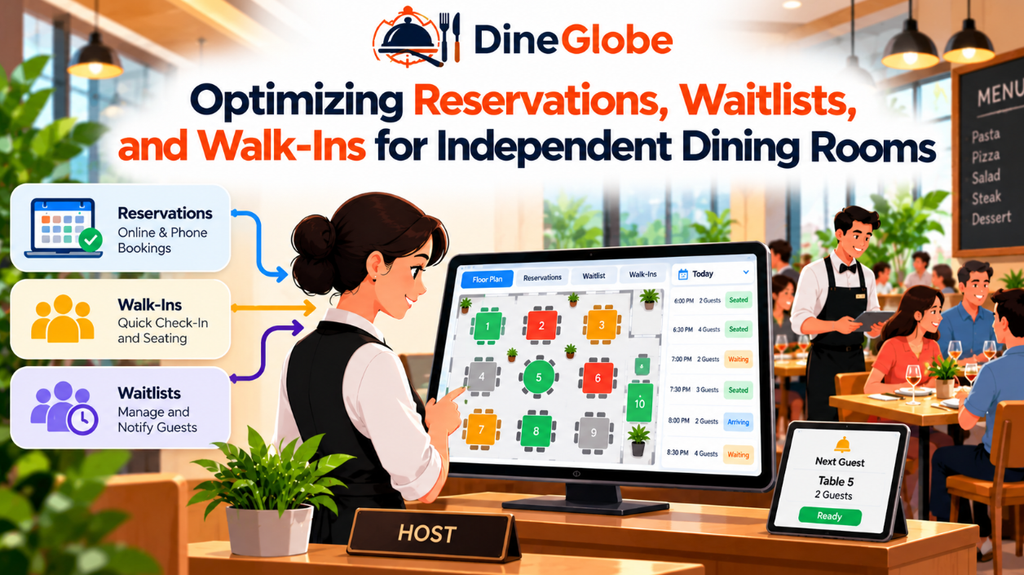
Every dining room has a unique physical layout, from cozy booths near the window to large communal tables in the center. Managing these spaces effectively requires a clear visual representation of the room. Restaurant Floor Plan Software helps teams represent their dining-room layout and understand how available tables relate to confirmed bookings, when these functions are supported by the system.
Consider a busy Friday evening when a party of six arrives unexpectedly while two tables of four are currently occupied. Staff need to know quickly whether tables can be pushed together without blocking main walkways or exceeding safety limits. Visual layout tools help hosts see combined table options, reservation holds, and seating buffers designed to prevent overcrowding in high-traffic zones.
Matching physical capacity with incoming reservations also reduces friction between the floor and the kitchen. When servers and hosts share a live view of table statuses, they can stagger arrivals more effectively. This prevents the kitchen from receiving too many orders at once, helping maintain consistent food quality and service speed throughout the shift.
Managing Waitlists and Managing Unexpected Arrivals
Even with careful planning, busy dining rooms frequently experience high demand that exceeds available seating. When walk-in guests arrive during peak hours, front-of-house teams need reliable ways to manage the queue without creating confusion at the door. Restaurant Waitlist Management Software provides a structured way to record guest names, contact details, and party sizes when every table is occupied.
Giving guests realistic waiting-time estimates is essential for a positive experience. While estimated wait times are never exact guarantees—since dining durations vary by party and menu choices—digital tracking tools help hosts communicate more clearly. As tables are cleared and reset, the system updates the queue so staff can call the next party promptly.
Handling walk-in traffic alongside pre-booked reservations requires careful balancing. Using Restaurant Walk-In Management Software allows team members to register walk-in guests, assign them to available or soon-to-be-available tables, and keep the master seating chart accurate in real time. This ensures that neither reservation holders nor walk-in guests are overlooked during a hectic service.
Empowering Front-of-House Hosts and Service Teams
The front-of-house host stands at the center of daily restaurant communication. During a busy shift, hosts must juggle phone inquiries, greet arriving guests, update table statuses, and coordinate with servers. Providing staff with a dedicated Restaurant Host Stand Software interface gives team members a clear, centralized view of upcoming reservations, active walk-ins, seated parties, and open tables.
When hosts can view operational updates at a glance, they spend less time searching through paper notes and more time welcoming guests. Role-based access controls also ensure that staff members can view or update only the information relevant to their duties, keeping service organized and secure. Multilingual interface options further assist diverse hospitality teams in communicating effectively during multi-language shifts.
Supporting Independent Restaurants and Growing Teams
Independent restaurants often operate with lean teams where every staff member wears multiple hats. For these venues, selecting technology that is intuitive and quick to learn is just as important as the feature set itself. Restaurant Reservation Software for Small Restaurants offers streamlined workflows that do not require extensive technical training, allowing new hosts and managers to master the system quickly.
Small and growing restaurants also benefit from maintaining direct relationships with their regular guests. Implementing a Direct Restaurant Booking System gives restaurants a way to accept reservations through their own booking channel and maintain greater control over the guest booking experience, rather than depending entirely on third-party dining marketplaces.
When evaluating tools, operators should consider whether a platform scales with their needs. A balanced software selection process looks closely at daily operating requirements, staff capacity, and guest communication policies to ensure the chosen tool supports sustainable growth.
Exploring Pilot Programs and Free Access Options
Many restaurant operators want to test digital booking tools before committing to a long-term software subscription. Exploring a Free Restaurant Reservation System or participating in a vendor pilot program can be a practical way to evaluate software capabilities in a live dining environment.
However, restaurant owners should carefully review what is included during a trial or pilot phase. Key factors to examine include:
- Feature Limits: Check which core tools, such as floor plans or waitlists, are active.
- Usage Caps: Confirm whether there are limits on monthly bookings or active tables.
- Staff Accounts: Verify how many user profiles or role-based permissions are supported.
- Support and Onboarding: Understand what assistance is available if questions arise during setup.
DineGlobe offers a pilot program featuring a free reservation system with access to available booking and operational features, allowing qualifying venues to test digital scheduling workflows directly.
Frequently Asked Questions
- What is the main benefit of using digital reservation tools?
Digital tools help restaurants organize bookings, track table availability, reduce scheduling conflicts, and improve communication between front-of-house and kitchen teams. - Can guests book tables directly through a restaurant’s website?
Yes. An Online Restaurant Booking System allows guests to view available times and secure reservations directly through a restaurant’s dedicated booking page. - How does table management software help during busy services?
It provides a centralized view of table occupancy, seating capacities, and reservation times, helping hosts seat parties efficiently and avoid double bookings. - What should I look for in a waitlist management tool?
Look for features that let staff record party details, provide realistic wait estimates, update queues dynamically, and communicate clearly with waiting guests. - Are floor plan tools useful for small dining rooms?
Even smaller venues benefit from visual layouts that help staff track table sizes, combined seating options, and reservation holds during peak hours. - How do walk-in tools differ from reservation calendars?
Walk-in tools are designed specifically to record unreserved guests arriving at the door and integrate them into the live seating queue alongside scheduled parties. - What should independent restaurants consider when choosing software?
Independent operators should look for ease of use, quick staff onboarding, clear booking policies, and workflows that match their specific service style. - What is included in DineGlobe’s pilot program?
DineGlobe offers a pilot program providing access to a free reservation system with available booking and operational features for participating restaurants.
Conclusion
Managing a successful dining room relies on clear communication, organized scheduling, and reliable tools that support the front-of-house team. Whether handling advance bookings, coordinating floor plans, or managing waitlists during peak hours, structured workflows help reduce stress for staff and create a welcoming experience for guests. Platforms like DineGlobe offer practical solutions for independent restaurants and growing teams seeking to streamline their daily operations. By evaluating your restaurant’s unique needs and exploring available pilot options, you can choose the right operational tools to support your service goals.
