$100 Website Offer

Get your personal website + domain for just $100.

Limited Time Offer!

Claim Your Website Now

How to enable wordpress post byt default comment enabled

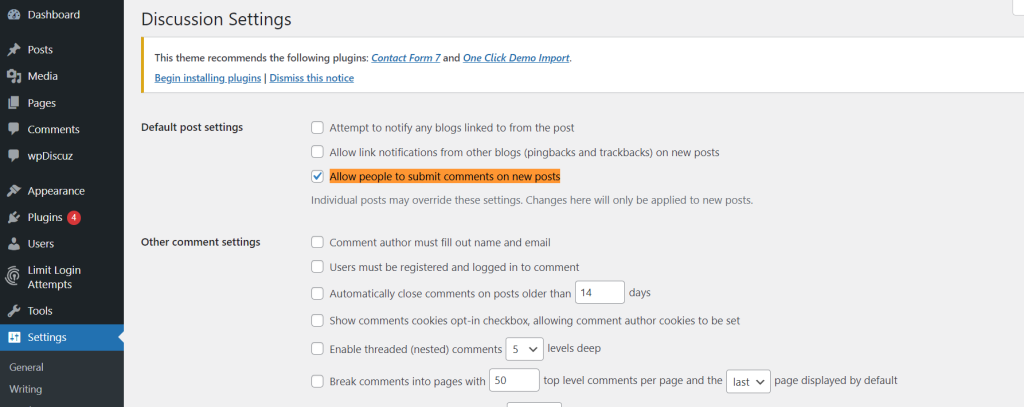
To ensure that comments are enabled by default on new WordPress posts, follow these steps:

  1. Dashboard Settings:
    1. Log into your WordPress dashboard.
    2. Navigate to Settings > Discussion.
    3. Under the “Default article settings” section, make sure that the option “Allow people to submit comments on new posts” is checked.
    4. Scroll down and click on the Save Changes button.
  2. Post-Level Settings (for already published posts):If you have existing posts where comments are disabled, and you wish to enable them:
    1. Go to Posts > All Posts in your WordPress dashboard.
    2. You can use the bulk edit feature to enable comments on multiple posts at once. Simply select the posts you wish to enable comments for, then choose “Edit” from the “Bulk Actions” dropdown and click Apply.
    3. In the bulk edit interface, set the “Comments” dropdown to “Allow”, and then click the Update button.
  3. Individual Post Editor:Every time you create or edit a post, you can decide whether to allow comments or not:
    1. When editing or creating a post, make sure you’re in the “Document” tab on the right side of the block editor.
    2. Scroll down and look for the “Discussion” section.
    3. If you don’t see the “Discussion” section, click on the three-dot menu at the top right corner of the editor and select “Options”. Under the “Advanced panels” section, make sure “Discussion” is checked.
    4. Under the “Discussion” section, check the box that says “Allow Comments”.
    5. Publish or update the post.

Related Posts

CMS Website Development Checklist: A Step-by-Step Guide for Business Owners

Introduction Your website is the digital headquarters of your business. It operates as your 24/7 sales representative, your primary marketing asset, and the first point of contact…

Read More

How to Choose the Right CMS for Your Business Website

Introduction A website serves as the digital engine of a modern business, but the software powering it determines how fast, secure, and adaptable that engine truly is….

Read More

Common CMS Website Mistakes and How to Avoid Them

Introduction A Content Management System (CMS) offers an accessible way to build, manage, and update a website without needing to write code from scratch. Because platforms like…

Read More

The Amaravati Discovery Guide: Sightseeing and Local Events

Introduction Amaravati is a destination where thousands of years of history, profound spiritual heritage, and evolving modern regional dynamics intersect. Situated along the southern banks of the…

Read More

Navigating DataOps Courses, Certifications, and Professional Services

Introduction Modern organizations rely on fast, accurate, and accessible data to drive operations, customer experiences, and strategic decisions. Yet, as data volumes grow and data architectures expand…

Read More

Integrating AI Software Development with Cloud and DevOps Pipelines

Introduction Modern software engineering has moved far beyond traditional application coding and routine deployments. Organizations across industries are racing to build intelligent, cloud-native platforms capable of processing…

Read More
Subscribe
Notify of
guest
0 Comments
Oldest
Newest Most Voted
Inline Feedbacks
View all comments
0
Would love your thoughts, please comment.x
()
x