Introduction
For startups and small businesses, a digital footprint is no longer a luxury—it is the foundation of market credibility. A business website serves as a 24/7 digital storefront, a primary brand touchpoint, and the hub of all digital marketing efforts. Whether the goal is to secure venture capital, drive local foot traffic, or scale an e-commerce operation, a professional online presence is critical to market survival.
Despite its importance, the path to a successful launch is riddled with challenges. Many entrepreneurs struggle with scope creep, unexpected technical debt, misaligned business objectives, and platform choice paralysis. Choosing between a simple page builder and a robust Content Management System (CMS) often leads to costly re-platforming down the line.
Why Websites Matter for Startups and Small Businesses
The Role of a Website in Business Growth
A Small Business Website is more than an informational brochure; it is an active engine for revenue generation. It democratizes the market, allowing emerging brands to compete directly with established industry giants.
- Credibility and Brand Equity: Modern consumers research vendors online before making a purchase. A polished, functional website establishes instant legitimacy.
- Lead Generation and Client Acquisition: Through tailored landing pages, strategic forms, and clear funnels, a website continuously captures and qualifies intent-driven leads.
- Data Ownership: Unlike third-party social media algorithms, a proprietary website gives businesses total control over their user data, brand narrative, and customer experience.
Data-Driven Digital Insights
Data highlights the critical role of web architecture on consumer behavior:
- First Impressions: 94% of first impressions are design-related. Users judge a company’s credibility based on visual layout and ease of navigation.
- Mobile Dominance: Over 55% of global web traffic originates from mobile devices. Google enforces mobile-first indexing, meaning a site’s search visibility depends heavily on its mobile performance.
- Speed and Abandonment: A delay of just one second in page load times can reduce conversions by 7%. If a page takes longer than three seconds to load, 40% of consumers will abandon it.
- Search Engine Intent: 53% of all trackable website traffic comes from organic search, underscoring the value of building an SEO-Friendly Website from the start.
Common Website Development Mistakes
Many startups waste capital by making critical execution errors early on. Recognizing these pitfalls helps businesses protect their investments:
- Over-Engineering Early On: Building complex, custom features before validating market demand leads to inflated budgets and delayed product launches.
- Ignoring SEO Architecture: Treating search engine optimization as a post-launch add-on rather than incorporating it into the initial design phase forces extensive, expensive reworks later.
- Platform Under-Scaling: Selecting highly restrictive DIY platforms can save money short-term but often fails to handle growing traffic or complex feature additions as the business expands.
What Is a Website Development Roadmap?
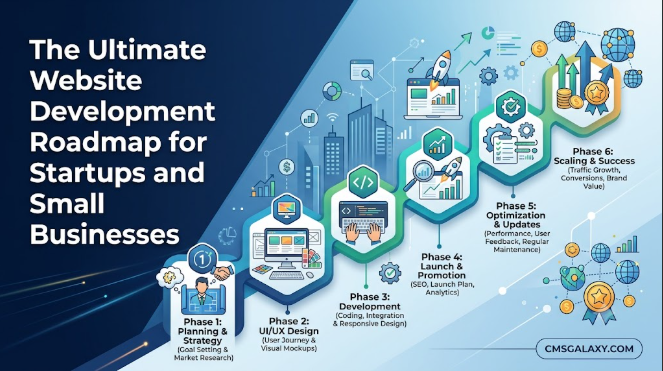
A Website Development Roadmap is a strategic blueprint that aligns a website’s technical execution with broader business milestones. It outlines the project’s phases, key deliverables, dependencies, and resource allocations from initial discovery to post-launch optimization.
[Discovery & Strategy] ➔ [UX/UI Architecture] ➔ [Technical Development] ➔ [Content & SEO] ➔ [QA & Launch]
By adhering to a structured roadmap, businesses can mitigate risk, control costs, maintain cross-functional alignment, and avoid scope creep. This ensures the final digital product directly supports the company’s financial and operational goals.
Strategic Foundations: Planning and Strategy
Understanding Business Goals Before Development
Before writing any code or designing a layout, project stakeholders must define the website’s core business objectives. Every technical decision should stem from these predefined goals:
- Lead Generation: Focuses on gated content, high-converting forms, and integrated CRM workflows.
- E-commerce: Prioritizes secure checkout paths, inventory management integrations, and streamlined user funnels.
- Brand Awareness: Centers on immersive media, editorial content hubs, and social validation elements.
Identifying Target Audience and User Needs
An effective Business Website Strategy relies on detailed target user personas. Developing these personas involves analyzing demographics, technical literacy, pain points, and specific search intent. Designing user journeys tailored to these behaviors ensures visitors find the exact information they need with minimal friction.
Website Architecture and Navigation Planning
Information Architecture (IA) defines the structural framework of a digital platform. A clear, hierarchical navigation path improves the user experience and helps search engines crawl and index content efficiently. Teams should map out structural wireframes to ensure essential services or product lines are accessible within three clicks from the homepage.
Infrastructure and Platform Selection
Choosing the Right Domain Name
A domain name is a core component of digital brand identity. It should be concise, memorable, and aligned with the corporate entity. Avoid hyphens, numbers, or obscure top-level domains (TLDs) that might confuse users or erode brand trust.
Selecting Hosting Infrastructure
Web hosting affects site speed, security, and uptime. Businesses must evaluate hosting options based on projected traffic volume, technical expertise, and security compliance requirements:
- Shared Hosting: Cost-effective for low-traffic informational sites, but presents performance and security risks if neighboring sites experience traffic spikes or security breaches.
- Cloud Hosting: Offers scalable resource allocation, strong redundancy, and high uptime by distributing data across a network of virtual servers.
- Dedicated Hosting: Provides maximum performance, security, and administrative control, though it requires significant internal technical management.
Choosing the Right CMS Platform
Selecting a Content Management System is a critical foundational decision. A well-chosen platform balance administrative ease of use with the flexibility needed for custom features and integrations.
- WordPress: Powers over 40% of the web. It offers vast theme and plugin ecosystems, making it highly customizable for content hubs, local business pages, and standard lead generation sites.
- Drupal / Joomla: Suited for complex enterprise architectures, multi-site deployments, and institutions requiring rigorous security and advanced user permission settings.
- Shopify / WooCommerce: Purpose-built for robust e-commerce applications, streamlining product catalogs, secure payment processing, and fulfillment pipelines.
Designing for Conversion: UI/UX and Mobile Optimization
UI/UX Design Fundamentals
User Interface (UI) and User Experience (UX) design directly impact conversion metrics. A professional design balance visual aesthetics with intuitive functionality:
- Visual Hierarchy: Guide the user’s eye to primary elements using size, contrast, and strategic spacing.
- Cognitive Load Reduction: Simplify layouts and eliminate non-essential decorative elements to keep users focused on key information.
- Micro-interactions: Implement subtle animations and visual feedback on form submissions and button clicks to make the site feel responsive and alive.
Mobile-First Website Development
With mobile devices driving the majority of web traffic, design teams must adopt a mobile-first approach. Rather than scaling a desktop design down, start by optimizing layouts for compact screens, touch inputs, and varied network speeds. This foundation can then be enhanced for larger desktop monitors.
Content Planning and Website Copywriting
A visually stunning website will underperform without clear, persuasive copy. Content planning should align with target search intent, addressing customer pain points directly. Clear value propositions must sit above the fold, supported by logical body text and distinct calls-to-action (CTAs) that guide users toward conversion.
Technical Development, Security, and Performance
SEO-Friendly Website Development
True Professional Website Development integrates technical SEO straight into the core codebase. This foundational approach covers:
- Semantic HTML: Using tags correctly (
<header>,<nav>,<main>,<article>,<footer>) to help search crawlers understand page structure. - Schema Markup: Injecting structured data snippets to help search engines display rich results, enhancing click-through rates.
- Clean URL Structures: Implementing descriptive, lowercase, keyword-optimized URL paths that benefit both human readers and search bots.
Website Security Best Practices
A security breach can severely damage a young brand’s reputation and search ranking. Implement robust defense measures across the entire infrastructure:
- SSL/TLS Certificates: Mandatory encryption protocols that protect data in transit and satisfy browser security compliance.
- Web Application Firewalls (WAF): Security layers that monitor and filter incoming traffic to block malicious exploits and DDoS attacks.
- Access Control Measures: Enforcing strong password criteria, multi-factor authentication (MFA), and role-based permissions for all administrative users.
Performance Optimization and Speed
Maximizing speed requires a multi-layered technical optimization strategy:
- Image Compression: Utilizing modern formats like WebP or AVIF alongside lazy loading scripts to reduce initial page payloads.
- Code Minification: Eliminating superfluous white space, comments, and unused code blocks within CSS, JavaScript, and HTML documents.
- Browser Caching & CDNs: Storing static assets on global Content Delivery Networks (CDNs) to reduce latency by serving files from servers closest to the user.
The Step-by-Step Website Development Roadmap
Building an authoritative, scalable digital presence requires executing an iterative, phased workflow.
+------------------------------------------------------------+
|        Phase 1: Business Discovery & Goal Definition       |
+------------------------------------------------------------+
                              |
                              v
+------------------------------------------------------------+
|         Phase 2: Market & Competitor Research              |
+------------------------------------------------------------+
                              |
                              v
+------------------------------------------------------------+
|         Phase 3: Website Planning & Architecture           |
+------------------------------------------------------------+
                              |
                              v
+------------------------------------------------------------+
|           Phase 4: UI/UX Design & Wireframing              |
+------------------------------------------------------------+
                              |
                              v
+------------------------------------------------------------+
|          Phase 5: Technical Website Development            |
+------------------------------------------------------------+
                              |
                              v
+------------------------------------------------------------+
|         Phase 6: Content Creation & Copywriting            |
+------------------------------------------------------------+
                              |
                              v
+------------------------------------------------------------+
|          Phase 7: Technical & On-Page SEO                  |
+------------------------------------------------------------+
                              |
                              v
+------------------------------------------------------------+
|         Phase 8: Quality Assurance & Launch                |
+------------------------------------------------------------+
                              |
                              v
+------------------------------------------------------------+
|        Phase 9: Maintenance & Growth Optimization          |
+------------------------------------------------------------+
Phase 1: Business Discovery and Goal Definition
- Objectives: Establish project boundaries, define key business goals, and list required integrations.
- Key Activities: Stakeholder interviews, budget allocation reviews, and timeline scoping.
- Deliverables: Project charter and a comprehensive technical requirements document.
- Expected Outcomes: Complete cross-functional alignment on project scope, cost, and deadlines.
Phase 2: Market and Competitor Research
- Objectives: Analyze competitor web presences and identify market opportunities.
- Key Activities: Audit direct competitor sites, evaluate user experience gaps, and research primary keywords.
- Deliverables: Competitive analysis matrix and feature gap assessment report.
- Expected Outcomes: A clear strategy for positioning the website effectively against competitors.
Phase 3: Website Planning and Architecture
- Objectives: Outline the site’s structural layout and content organization.
- Key Activities: Mapping information architecture, drafting sitemaps, and designing functional user paths.
- Deliverables: Finalized structural sitemap and user journey diagrams.
- Expected Outcomes: A comprehensive blueprint for the site’s layout and internal link structure.
Phase 4: Design and User Experience
- Objectives: Establish the visual identity and layout of the platform.
- Key Activities: Sketching low-fidelity wireframes, designing high-fidelity UI mockups, and building interactive prototypes.
- Deliverables: UI style guides, asset packages, and sign-off on interactive prototypes.
- Expected Outcomes: A user-validated, visually cohesive interface ready for front-end development.
Phase 5: Website Development
- Objectives: Transform design visual assets into clean, functional, production-ready code.
- Key Activities: Setting up the database architecture, building custom theme components, and integrating third-party APIs.
- Deliverables: A fully functional staging environment containing the compiled codebase.
- Expected Outcomes: A secure, dynamic, responsive website ready for content entry and testing.
Phase 6: Content Creation
- Objectives: Produce optimized text, imagery, and video assets.
- Key Activities: Writing persuasive website copy, optimizing images, and building resources like FAQs and whitepapers.
- Deliverables: Completed content matrix populated with approved media assets.
- Expected Outcomes: Relevant, high-quality content integrated across all staging URLs.
Phase 7: SEO Optimization
- Objectives: Configure the site to maximize early organic visibility.
- Key Activities: Formatting meta tags, configuring internal linking structures, and implementing schema markup.
- Deliverables: Configured XML sitemap and a finalized structural SEO audit report.
- Expected Outcomes: A platform engineered to rank high on search engines right from launch.
Phase 8: Testing and Launch
- Objectives: Verify platform integrity across diverse environments and execute the live deployment.
- Key Activities: Cross-browser validation, broken link checks, stress testing, and moving code to production servers.
- Deliverables: Pre-launch QA checklist logs and the live website deployment.
- Expected Outcomes: A seamless, bug-free public release with zero down-time.
Phase 9: Maintenance and Continuous Improvement
- Objectives: Keep the site secure, fast, and aligned with changing user behaviors.
- Key Activities: Monitoring security patches, analyzing conversion funnels via heatmaps, and running iterative A/B feature tests.
- Deliverables: Monthly security logs and performance reports.
- Expected Outcomes: A stable, continuously evolving website that scales with business growth.
Essential Features Every Small Business Website Should Have
To turn casual traffic into loyal customers, a website needs specific core features built directly into its architecture:
- Responsive Design: Fluid fluid grids and flexible images that adjust automatically across desktops, tablets, and smartphones.
- Secure, Validated Contact Forms: Easy-to-use lead capture forms with anti-spam protection (like reCAPTCHA) linked straight to your CRM.
- Fast Loading Speed: Optimized assets, minified code, and strategic caching to deliver sub-second load times.
- Comprehensive Technical SEO: On-page optimization, XML sitemaps, and clean URL routing for better search rankings.
- Advanced Security Configurations: SSL protection, custom login paths, and active firewall monitoring.
- Analytics Integration: Native tracking setup for platforms like Google Analytics 4 and Google Search Console to monitor user behavior.
- Lead Generation Infrastructure: Sticky header navigation, targeted exit-intent popups, and gated resources.
- Social Proof & Media Integration: Secure social profile badges, embedded review carousels, and share buttons.
- Clear Calls-to-Action (CTAs): High-contrast, action-driven buttons placed strategically to guide users to convert.
Strategic Framework Comparisons
DIY Website Builders vs. Professional Website Development
| Evaluation Criteria | DIY Website Builders (e.g., Wix, Squarespace) | Professional Website Development (CMS Platforms) |
| Initial Financial Outlay | Very low upfront costs. | Higher initial strategic investment. |
| Design Flexibility | Limited to pre-made templates. | Complete custom design control. |
| Platform Scalability | Low; often requires complete re-platforming later. | High; grows alongside your business. |
| SEO Control | Basic structural on-page options. | Advanced, deep technical optimization capabilities. |
| Code Ownership | Locked within a proprietary ecosystem. | Total ownership of your source code and data. |
Static Websites vs. CMS Websites
| Architectural Feature | Static Websites (HTML/CSS/JS files) | CMS Websites (WordPress, Drupal, etc.) |
| Content Updates | Requires editing raw code files. | Simple dashboard for easy text/media edits. |
| Feature Complexity | Limited mostly to informational pages. | Easily handles blogs, portals, and e-commerce. |
| Speed/Performance | Highly optimized out of the box. | Requires proper server and caching setup. |
| Initial Cost | Lower development costs. | Higher initial setup, lower long-term management costs. |
Shared Hosting vs. Cloud Hosting
| Infrastructure Attribute | Shared Hosting Platforms | Cloud Hosting Environments |
| Resource Allocation | Resources are split with other websites. | Dedicated, scalable virtual resources. |
| Traffic Resilience | Vulnerable to crashes during sudden traffic spikes. | Dynamically scales resources to handle traffic surges. |
| Security Risks | High risk of cross-site infection. | Isolated virtual servers protect your data. |
| Pricing Models | Fixed monthly or annual fees. | Pay-as-you-use, flexible scaling tiers. |
Startup Website Requirements vs. Enterprise Website Requirements
| Operational Scope | Startup Website Needs | Enterprise Website Needs |
| Primary Goal | Fast market validation and lead capture. | Brand consistency, compliance, and large-scale data workflows. |
| Feature Focus | Landing pages, MVPs, and flexible blogging tools. | Multi-language support, custom APIs, and advanced user roles. |
| Security Compliance | Standard SSL and basic server protections. | Strict global standards (GDPR, HIPAA, SOC2). |
| Content Volume | Typically under 50 core pages. | Thousands of pages across multiple sub-brands. |
Website Development Mistakes vs. Best Practices
| Common Implementation Mistakes | Strategic Engineering Best Practices |
| Launching without tracking analytics configured. | Embedding Google Analytics 4 and custom conversion tracking early. |
| Using overly heavy, uncompressed images. | Implementing modern file formats (WebP/AVIF) and lazy-loading. |
| Delaying SEO planning until after launch. | Building the entire site structure on keyword research from day one. |
| Leaving core plugins and software outdated. | Enforcing regular, automated patch and backup schedules. |
Website Development Checklist for Startups and Small Businesses
Use this actionable checklist during your development cycle to keep your project on track:
1. Strategy & Discovery
- [ ] Define 3 core measurable KPIs for the website.
- [ ] Complete detailed target audience persona sheets.
- [ ] Run a thorough competitive feature gap analysis.
2. Infrastructure Setup
- [ ] Register a clean, brand-aligned domain name.
- [ ] Set up secure cloud hosting suited for your projected traffic.
- [ ] Install a valid SSL certificate and enforce HTTPS routing.
3. Architecture & Content Planning
- [ ] Finalize a structural sitemap (keeping primary pages within 3 clicks of home).
- [ ] Complete keyword research and map terms to specific landing pages.
- [ ] Write approved web copy for every single planned URL.
4. Technical SEO Setup
- [ ] Craft distinct meta titles and descriptions for every page.
- [ ] Implement correct semantic HTML tags throughout the code.
- [ ] Configure clean, descriptive URL paths across the entire site.
5. Quality Assurance Testing
- [ ] Verify layout responsiveness across mobile, tablet, and desktop viewports.
- [ ] Run performance tests to ensure PageSpeed Insights scores hit 90+.
- [ ] Double-check that all links work and form completions route correctly.
How CMSGalaxy Elevates Your Digital Presence
Building a high-performing digital platform requires blending technical expertise with business strategy. CMSGalaxy partners with startups and small businesses to deliver tailored, high-converting web solutions.
- Website Strategy Consulting: We align your site’s technical architecture with your business model, identifying growth opportunities right from day one.
- CMS Implementation & Custom Development: Our team builds secure, scalable platforms on systems like WordPress and Drupal, avoiding restrictive page builders to give you full data ownership.
- SEO-Ready Architecture & UX Optimization: We weave technical SEO and mobile-first responsive design straight into the codebase to maximize visibility and lower user bounce rates.
- Security, Maintenance & Growth Support: We offer ongoing patch management, backup scheduling, and speed optimization to keep your platform fast, secure, and ready to scale.
Real-World Success Stories
Startup Launch Scenario: A growing B2B SaaS startup needed an MVP website quickly to validate their product with investors. CMSGalaxy delivered an agile, block-based WordPress architecture in just three weeks. This scalable setup let the startup quickly publish landing pages, helping them secure their seed funding round with a professional digital presence.
Small Business Transformation: A local service provider was losing leads due to a slow, outdated website. CMSGalaxy redesigned their platform from the ground up, optimizing performance and adding strategic call-to-actions. The results were immediate: page load times dropped below 1.5 seconds, and organic lead form submissions jumped by 42% within the first two months.
Frequently Asked Questions
How long does it typically take to develop a small business website?
A standard informational or lead-generation website for a small business usually takes between 4 to 8 weeks from discovery to launch. More complex e-commerce platforms or custom enterprise CMS applications can take 12 weeks or longer, depending on the required features and integrations.
Which CMS platform is ideal for an early-stage startup?
WordPress is highly recommended for most early-stage startups because of its flexibility, large developer community, and ease of content management. For dedicated, product-heavy e-commerce companies, Shopify or WooCommerce usually provides the best balance of features and scalability.
How much does a professional website development project cost?
Costs vary based on the project’s complexity, design customizability, and functional integrations. A professional small business website built on a robust CMS can range from several thousand dollars to larger investments for custom enterprise solutions. Contact CMSGalaxy for a tailored quote built around your business goals.
Can we migrate our existing website to a new CMS without losing our SEO rankings?
Yes, but it requires a careful, strategic migration plan. By mapping out proper 301 redirect paths, matching page content, preserving metadata structures, and submitting updated XML sitemaps through Google Search Console, you can update your CMS while protecting your hard-earned search rankings.
What are the ongoing monthly costs of running a professional website?
Ongoing expenses generally cover your cloud hosting infrastructure, domain renewals, premium plugin or API subscriptions, and regular security maintenance support. Investing in a structured maintenance plan keeps your platform fast, secure, and up to date.
Why should we choose a custom CMS build over a free website builder template?
Free or cheap website builders often lock you into rigid templates, limit your technical SEO control, and cause performance bottlenecks as your traffic grows. A custom CMS build gives you full code ownership, unrestricted scalability, and a unique design tailored to maximize your business conversions.
How often should our company website undergo a complete redesign?
Most high-growth businesses refresh or redesign their websites every 2 to 3 years. This keeps the platform aligned with new web technologies, shifting user expectations, visual trends, and your own evolving business offerings.
Conclusion
A successful website relies on a strategic balance of business goals, technical execution, and user experience. Following a structured Website Development Roadmap protects your initial investment, prevents scope creep, and ensures your final platform actively drives revenue and business growth.
Building an authoritative digital presence doesn’t have to be an overwhelming challenge. Partnering with experienced professionals streamlines your development journey, setting your business up for long-term success. Contact CMSGalaxy today to speak with our technical consultants and map out your custom website strategy.
