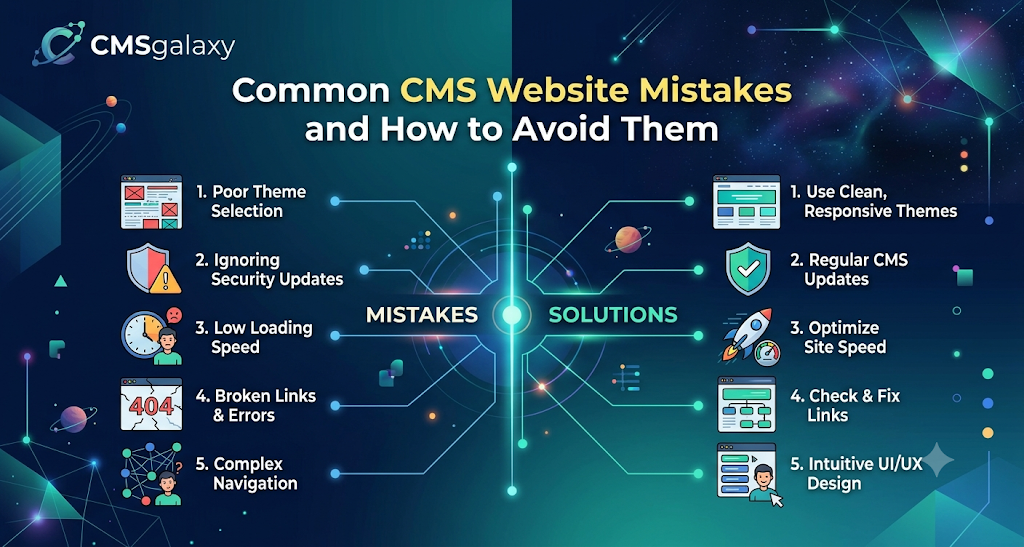
Introduction
A Content Management System (CMS) offers an accessible way to build, manage, and update a website without needing to write code from scratch. Because platforms like WordPress, Shopify, Drupal, or Webflow are highly user-friendly, many businesses assume that launching a website is a simple, foolproof process. However, easy website management does not automatically guarantee a successful, high-performing website.
Beneath a beautiful visual interface, technical SEO, security, UX, and content mistakes can silently sabotage a website’s potential. A poorly configured CMS can lead to frustratingly slow page load times, vulnerable security loopholes, and invisible pages that search engines refuse to rank.
Identifying these CMS website mistakes early matters. Fixing a flawed website foundation is significantly more expensive and time-consuming than building it correctly from the start. In this comprehensive guide, you will learn the most common pitfalls of CMS website development and maintenance, understand how they impact your business, and discover actionable ways to prevent or fix them.
What Is a CMS Website?
A Content Management System (CMS) is a software application that allows users to build, manage, and modify website content without needing specialized technical knowledge.
At its core, a CMS separates the content of your website (text, images, videos) from the design and functionality. It relies on several key components:
- Themes and templates: Pre-designed layouts that dictate how your website looks.
- Plugins, extensions, and integrations: Add-on software that expands the functionality of the CMS (e.g., adding an SEO tool, a contact form, or a payment gateway).
- Content management: An intuitive dashboard where administrators can draft blog posts, upload images, and create new pages.
- Website administration: The backend settings where site owners configure user permissions, URLs, and site-wide rules.
Why CMS Website Mistakes Matter
A CMS provides the structural foundation for your digital presence. When that foundation is flawed, the ripple effects damage every aspect of your online operations. Poor CMS implementation or management can negatively affect:
- Search rankings: Search engines penalize sites with broken links, slow speeds, and poor indexing configurations.
- Website speed: Bloated code and excessive plugins increase page load times, frustrating users.
- Security: Misconfigured settings or outdated software make the site a prime target for cyberattacks and malware.
- User experience (UX): Confusing layouts and broken elements drive potential customers away.
- Mobile usability: Non-responsive designs alienate the majority of internet users who browse on smartphones.
- Accessibility: Failing to accommodate users with disabilities limits your audience and invites legal risks.
- Conversions: If a site is slow or hard to navigate, visitors will not fill out forms or make purchases.
- Brand credibility: A broken, outdated, or hacked website instantly erodes consumer trust.
- Maintenance costs: Fixing preventable mistakes requires emergency developer intervention, costing far more than proactive maintenance.
Common CMS Website Mistakes
Whether you are launching a new site or managing an existing one, watch out for these 15 frequent errors.
1. Choosing the Wrong CMS
Not all CMS platforms serve the same purpose. A small local bakery does not need the complex, enterprise-level architecture of Drupal, and a massive multi-vendor e-commerce store will struggle on a basic blogging platform. Choosing the wrong CMS forces you to heavily modify the platform to meet your business requirements, leading to bloated code and high development costs. Always evaluate scalability, ease of management, necessary customizations, budget, and technical requirements before committing to a platform.
2. Using an Unprofessional or Poorly Structured Theme
A theme dictates your website’s visual and structural framework. Many business owners choose a theme purely based on aesthetics, ignoring the underlying code. A poorly structured theme may look good but can severely restrict customization, break on mobile devices, lack accessibility standards, and slow down your website. Prioritize themes known for clean code, responsive design, and brand consistency.
3. Installing Too Many Plugins or Extensions
Plugins and extensions are a double-edged sword. While they add necessary functionality, installing too many creates major problems. Every plugin adds extra code that the server must process, leading to a significant performance impact. Furthermore, plugins created by different developers can conflict with one another, causing features to break. Only install extensions that are absolutely necessary for business operations.
4. Ignoring Website Security
CMS platforms are frequent targets for hackers because of their popularity. Ignoring website security is one of the most dangerous CMS website mistakes. Relying on weak passwords, downloading untrusted extensions from third-party forums, failing to implement access control, and lacking web application firewalls leave your data exposed. Always enforce strong, unique passwords, use two-factor authentication (2FA), and limit login attempts.
5. Neglecting CMS Updates
CMS developers regularly release updates to fix bugs, improve performance, and patch critical security vulnerabilities. Neglecting to update your CMS core, plugins, themes, and server dependencies is an open invitation to cybercriminals. However, applying updates blindly can also break your site if a new plugin version conflicts with your theme. Updates should ideally be tested in a staging environment before being pushed to your live website.
6. Ignoring Website Speed
Website performance optimization is critical for both UX and SEO. Common culprits for a slow CMS website include uploading massive, uncompressed images, running excessive third-party scripts, utilizing poor-quality budget hosting, and failing to use caching. A slow website leads to high bounce rates, which tells search engines that your site provides a poor user experience.
7. Failing to Optimize for Mobile Devices
With mobile traffic accounting for over half of global web traffic, failing to optimize for mobile devices is unacceptable. Simply having a “responsive design” that shrinks desktop elements to a smaller screen is not enough. You must ensure mobile navigation is intuitive, text readability is high without zooming, buttons are touch-friendly, and mobile page speed is lightning fast.
8. Poor Website Navigation
If users cannot find what they are looking for within a few seconds, they will leave. Complicated menus, unclear categories, and missing search functionality create confusing user journeys. Poor information architecture also confuses search engine crawlers, making it difficult for them to understand the hierarchy and importance of your pages.
9. Ignoring Technical SEO
Technical SEO ensures search engines can crawl and index your site effectively. Common CMS mistakes include failing to configure SEO-friendly URL structures, leaving page titles and meta descriptions blank, ignoring XML sitemaps, and mismanaging canonicalization (which causes duplicate content issues). Furthermore, failing to block staging pages with robots directives can lead to private pages appearing in search results.
10. Publishing Low-Quality or Duplicate Content
A CMS makes it easy to publish content, but volume does not equal value. Publishing thin content (pages with very little useful text), duplicating pages to target different cities without changing the actual text, or engaging in keyword stuffing will harm your SEO. Content must align with search intent, be well-formatted, and provide genuine value to the reader.
11. Ignoring Website Accessibility
Website accessibility ensures that people with visual, auditory, motor, or cognitive disabilities can use your site. Mistakes include missing Alt text on images, poor color contrast making text hard to read, inability to navigate the site using a keyboard, and non-semantic HTML. Ensuring your site meets standard accessibility guidelines is both an ethical responsibility and a UX best practice.
12. Not Creating Regular Backups
Hardware fails, servers crash, and websites get hacked. If you are not creating regular backups, a single error can wipe out years of work. Backups matter because they are your ultimate fail-safe. Ensure you have automated daily or weekly backups, store them off-site (not on the same server as your website), and periodically perform restoration testing to ensure the backup files actually work.
13. Poor User and Admin Access Management
Sharing a single admin credential among multiple employees is a major security risk. Excessive permissions allow junior staff to accidentally delete core pages or alter code. Furthermore, failing to revoke access for former employees or contractors leaves the CMS vulnerable. Always implement strict role-based access control (RBAC), giving users only the permissions they need to perform their jobs.
14. Ignoring Analytics and Monitoring
You cannot improve what you do not measure. Failing to implement and review analytics means you have no visibility into how users interact with your site. Monitoring traffic, search visibility, conversion behavior, performance bottlenecks, and security events allows you to make data-driven decisions rather than relying on guesswork.
15. Failing to Plan for Scalability
A website that works perfectly for 100 visitors a month might crash under the weight of 10,000 visitors. Failing to plan for scalability means your CMS will become difficult to manage when content grows, traffic spikes, new functional integrations are required, or multiple marketing teams require simultaneous backend access.
CMS Website Mistakes: Impact Comparison
Understanding the direct consequence of each mistake can help you prioritize your resources.
| CMS Mistake | Possible Impact | Warning Sign | Recommended Solution |
| Wrong CMS | High development costs, difficult to manage | Frequent need for custom coding for basic tasks | Map business requirements before choosing a platform |
| Too Many Plugins | Slow speed, security vulnerabilities | Site takes 5+ seconds to load, frequent crashes | Audit plugins quarterly; delete unused extensions |
| Poor Security | Data breaches, malware infections | Unknown admin accounts, spam links in content | Use strong passwords, 2FA, and security plugins/WAF |
| Slow Performance | High bounce rates, drop in SEO rankings | Poor Core Web Vitals scores | Optimize images, implement caching, upgrade hosting |
| Poor Mobile Design | Loss of mobile traffic and conversions | Elements overlapping on mobile screens | Use responsive themes, test on multiple mobile devices |
| Weak SEO | Pages fail to rank on search engines | Important pages missing from Google Search | Configure XML sitemaps, optimize metadata, fix broken links |
| Poor Content | Low engagement, poor search intent match | High bounce rate, low time-on-page | Audit existing content, remove or rewrite thin pages |
| Missing Backups | Total loss of website data | No recent backup files available | Automate off-site daily backups and test restorations |
| Poor Access Control | Accidental deletions, internal data breaches | Everyone uses the same “Admin” login | Implement role-based access control (RBAC) |
| No Analytics | Blind decision-making, wasted marketing budget | Inability to track where leads come from | Install and configure Google Analytics and Search Console |
Technical Mistakes vs Content Mistakes
CMS problems generally fall into two broad categories. Both require attention, as excelling in one while ignoring the other will still result in a failing website.
| Category | Focus Areas | Why It Needs Attention |
| Technical Mistakes | Technical SEO, website security, performance, UX, maintenance, code quality. | Technical elements form the foundation of the site. If the site is slow, broken, or insecure, users will not stick around to read the content, and search engines won’t crawl it. |
| Content Mistakes | Content quality, content structure, conversion optimization, search intent, accessibility. | Content is the reason users visit your site. Even with flawless technical execution, poor content will fail to convert visitors into customers and will not rank for valuable keywords. |
How to Avoid Common CMS Website Mistakes
To build and maintain a robust CMS website, implement this practical step-by-step framework:
- Define website goals: Understand what you need the site to achieve (e-commerce, lead generation, portfolio) before taking any technical steps.
- Select an appropriate CMS: Choose a platform that aligns with your goals, technical expertise, and scalability needs.
- Plan website architecture: Map out your navigation and page hierarchy to ensure a logical user journey.
- Choose a reliable design system: Select a clean, lightweight, and responsive theme from a reputable developer.
- Install only necessary extensions: Limit plugins to essential functionality to preserve speed and security.
- Configure security controls: Enforce strong passwords, limit login attempts, and use a web application firewall.
- Optimize performance: Compress all media, enable browser caching, and use a Content Delivery Network (CDN).
- Implement technical SEO: Configure your robots.txt, XML sitemap, clean URL structures, and canonical tags.
- Create useful content: Write high-quality, formatted content that directly answers user search intent.
- Test mobile usability: Manually test the site on various smartphones to ensure a frictionless mobile experience.
- Implement analytics: Set up tracking tools to monitor traffic, user behavior, and site errors.
- Create backups: Establish automated, secure, off-site backups.
- Monitor the website continuously: Keep an eye on uptime, security alerts, and performance metrics.
- Review and improve regularly: Schedule monthly check-ins to update software and audit content.
CMS Website Pre-Launch Checklist
Never launch a website without thoroughly testing it. Use this checklist to catch errors before your audience does.
Design
- [ ] Consistent branding (colors, fonts, logos) across all pages
- [ ] Responsive design adapts smoothly to mobile and tablet
- [ ] Clear, intuitive navigation menus
- [ ] Accessible interface (contrast, readable fonts)
SEO
- [ ] SEO-friendly URLs (short, descriptive, hyphenated)
- [ ] Unique page titles for every page
- [ ] Compelling meta descriptions included
- [ ] XML sitemap generated and submitted to search engines
- [ ] Indexing configuration checked (ensure site is not blocking search engines)
- [ ] Internal links logically connect related content
Performance
- [ ] Optimized images (compressed, modern formats like WebP)
- [ ] Fast page loading (target under 3 seconds)
- [ ] Efficient scripts (minified CSS/JS)
- [ ] Caching configured where appropriate
Security
- [ ] Strong authentication enforced for all users
- [ ] Updated CMS core
- [ ] Updated extensions and themes
- [ ] Automated backups configured and verified
- [ ] Appropriate user permissions assigned
Content
- [ ] Original, error-free content
- [ ] Clear HTML headings (H1, H2, H3) applied correctly
- [ ] Search intent alignment verified for key pages
- [ ] Accurate contact information and business data
- [ ] Clear, functional calls to action (CTAs)
CMS Maintenance Checklist
A CMS requires ongoing maintenance. Do not recommend unnecessary activities, but stick to this schedule for optimal health:
Weekly:
- Review and apply critical security patches for plugins or CMS core.
- Check automated backups to ensure they are completing successfully.
- Review website uptime and server response reports.
Monthly:
- Apply general updates to themes and non-critical plugins (test on staging first).
- Run a broken-link check and fix any 404 errors.
- Review website performance scores (Core Web Vitals) and address new bottlenecks.
- Analyze traffic and security logs for suspicious activity.
Quarterly:
- Conduct a comprehensive technical SEO audit.
- Review user access and remove permissions for former staff.
- Perform content reviews to update outdated information or consolidate thin pages.
- Test forms, checkout processes, and critical conversion paths.
How Professional CMS Development Can Reduce Website Problems
While modern CMS platforms are marketed as “do-it-yourself,” a DIY approach often falls short for scaling businesses. Professional website development provides immense value by ensuring proper planning and establishing a better architectural foundation from day one.
Professionals build with security and performance in mind, customizing themes cleanly without relying on a fragile web of third-party plugins. They implement advanced technical SEO configurations, ensure the UX is seamless across all devices, and construct the database so it can handle scalability. Ultimately, investing in professional development reduces long-term maintenance costs and minimizes the risk of catastrophic website failures.
How CMSGalaxy Can Help Businesses Avoid CMS Website Problems
Managing a secure, fast, and SEO-optimized website requires time and technical expertise that many business owners simply do not have. This is where professional partnerships become invaluable.
CMSGalaxy can help businesses overcome these challenges by providing expert website development and CMS implementation. By focusing on SEO-friendly development and secure website architecture, CMSGalaxy ensures that your digital foundation is built correctly from the start. Whether you require tailored business website solutions, custom website design, or ongoing website optimization and maintenance, leveraging a professional team ensures your CMS remains an asset to your business rather than a technical burden
Why Businesses Should Treat Their CMS as a Long-Term Digital Asset
A common misconception is that a website is a one-time project—you launch it, and you are done. In reality, a CMS website is a living digital asset.
As your business grows, your CMS must adapt. Continuous updates are required to maintain security against evolving cyber threats. Content growth necessitates regular SEO improvement to maintain and capture new search visibility. Furthermore, as browsers and devices evolve, ongoing performance optimization and user experience refinements are necessary to keep the site feeling modern. Treating your website as an ongoing investment ensures it continues to generate leads, process sales, and accurately represent your brand for years to come.
Practical CMS Website Examples
Consider these hypothetical examples to understand how CMS mistakes manifest in the real world:
Example 1: Small Business
A local plumbing company builds a DIY website using a bloated, multi-purpose theme. They feature complicated navigation and massive, uncompressed images of their work. The result? The site takes 8 seconds to load on mobile. Potential customers seeking emergency repairs leave immediately, costing the business thousands of dollars in lost leads due to slow performance and poor mobile design.
Example 2: Growing E-commerce Website
An online retailer experiences rapid growth and starts installing dozens of plugins for pop-ups, shipping calculators, and loyalty programs. They ignore CMS core updates out of fear that an update will break the plugins. A hacker exploits a vulnerability in an outdated plugin, injecting malware into the checkout page. The lack of security maintenance results in a data breach and severe reputation damage.
Example 3: Content-Heavy Business Website
A financial consulting firm publishes hundreds of blog posts over five years. However, they lack an SEO strategy, resulting in keyword cannibalization (multiple pages competing for the same search term), thin content, and missing meta descriptions. Despite having great information, their poor content organization and weak technical SEO prevent them from ranking on the first page of search results.
CMS Website Mistake Prevention Strategy
To keep your digital presence healthy, adopt this continuous lifecycle strategy:
Plan → Build → Secure → Optimize → Test → Monitor → Improve
- Plan: Map architecture, goals, and CMS choice.
- Build: Develop with clean code and minimal plugins.
- Secure: Implement strict access control, WAF, and backups.
- Optimize: Compress media, enable caching, and configure technical SEO.
- Test: Verify mobile usability, accessibility, and conversion paths.
- Monitor: Watch analytics, uptime, and security logs continuously.
- Improve: Conduct quarterly audits to refine content and performance.
Data and Industry Insights
Understanding the data behind website management highlights the importance of avoiding these mistakes:
- Mobile Usage: According to industry reports from 2023, over 55% of all global web traffic comes from mobile devices, reinforcing why failing to optimize for mobile is a critical error.
- Cybersecurity: Security firms routinely note that outdated software (plugins, themes, and CMS core) is the leading cause of website hacks for popular platforms.
- Website Performance: Google’s Core Web Vitals data indicates that as page load time increases from 1 second to 3 seconds, the probability of a user bouncing increases by over 30%.
- SEO: Websites that maintain strong technical SEO fundamentals and high-quality, updated content consistently capture the majority of organic search visibility, while sites with duplicate or thin content are frequently demoted in rankings.
FAQs
What are the most common CMS website mistakes?
The most frequent mistakes include choosing the wrong platform, installing too many plugins, neglecting software updates, ignoring mobile optimization, and failing to implement basic security measures.
How can CMS mistakes affect SEO?
Mistakes like slow page speeds, missing XML sitemaps, poor URL structures, and broken links prevent search engines from crawling and indexing your site effectively, leading to poor rankings.
Why is CMS security important?
CMS platforms are frequent targets for automated cyberattacks. Poor security can lead to data breaches, malware infections, stolen customer information, and complete website loss.
How often should a CMS website be updated?
Critical security patches should be applied immediately. General theme, plugin, and core updates should be reviewed and applied at least monthly, preferably after testing on a staging site.
Can too many plugins slow down a website?
Yes. Every plugin adds extra code and database queries. Excessive plugins bloat your website, slowing down load times and creating potential software conflicts.
Why does mobile optimization matter?
The majority of global internet users browse on mobile devices. Additionally, search engines like Google use mobile-first indexing, meaning they judge and rank your site based on its mobile version.
How can businesses improve CMS website performance?
Compress images before uploading, use a clean and lightweight theme, limit the number of active plugins, utilize caching, and invest in high-quality hosting.
What technical SEO issues are common on CMS websites?
Common issues include missing meta tags, duplicate content due to poor canonicalization, poorly structured URLs, and failing to block staging environments from search engine crawlers.
How often should CMS websites be backed up?
Websites should be backed up automatically on a daily or weekly basis, depending on how often content is updated. Backups must be stored off-site and tested regularly.
How can businesses improve CMS website security?
Enforce strong passwords, use two-factor authentication (2FA), limit user permissions based on roles, keep all software updated, and use a reliable security plugin or firewall.
What should be included in a CMS website audit?
An audit should evaluate technical SEO, mobile usability, page loading speed, broken links, outdated content, security vulnerabilities, and unused plugins.
How can professional CMS development reduce website problems?
Professionals build a scalable, secure, and optimized foundation from the start. They rely on clean code rather than excessive plugins, ensuring the site is fast, secure, and aligned with SEO best practices.
How can CMSGalaxy help with website development?
CMSGalaxy provides professional website development, CMS implementation, design, optimization, and ongoing maintenance to ensure your business website is secure, high-performing, and built for long-term success.
Conclusion
Building a successful online presence requires much more than simply installing a CMS and publishing a few pages. As outlined in this guide, common CMS website mistakes—ranging from ignoring critical security updates and installing too many plugins to neglecting technical SEO and mobile optimization—can severely restrict your business’s growth, compromise user data, and damage your brand’s reputation.
By understanding these pitfalls, you can adopt a proactive approach to website management. Prioritizing performance, enforcing strict security protocols, optimizing for user experience, and committing to regular maintenance will transform your CMS from a potential liability into a powerful digital asset.
For businesses that want to ensure their foundation is flawless from day one, partnering with experts is a strategic advantage. By leveraging professional website development and optimization services through CMSGalaxy, you can avoid these costly errors and focus your energy on what matters most: growing your business.
