$100 Website Offer

Get your personal website + domain for just $100.

Limited Time Offer!

Claim Your Website Now

How to Make a Git Repository Clone Go Into a Particular Folder

Step 1:

Let’s start by opening your terminal. If you’re using a Mac, it’s located in the Applications folder’s Utilities folder. You can launch Git Bash or the Command Prompt if you’re using Windows.
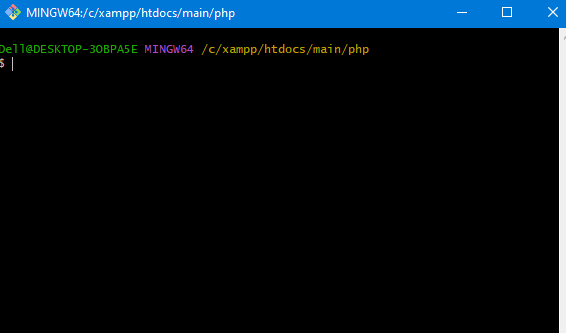
Step 2: Locate the Folder of Your Choice

Open your terminal and find the folder you wish to clone the Git repository from. To go to the target folder, run the cd command and then the directory path. For instance, you would use the following command to clone the repository into a folder named “my-project”:

cd /path/to/my-project
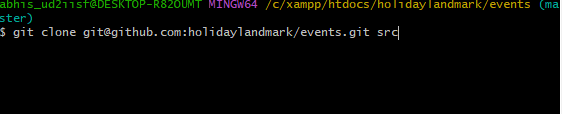
Step 3: Make a Git Repository Clone

It’s time to clone the Git repository now that you’re in the correct folder. You will need the repository’s URL in order to accomplish this. In most cases, the repository’s page on GitHub or another Git hosting service will provide the URL if you don’t have it.

Use the git clone command and the repository URL to clone the repository. For instance:
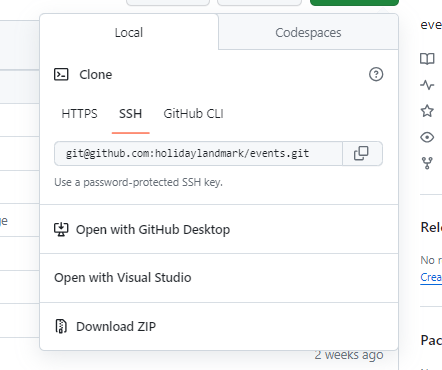
git clone git@github.com:holidaylandmark/events.git folder_name

Related Posts

Smarter Medical Travel Planning with MyMedicPlus Healthcare Assistance

Navigating the international medical landscape can often feel like an overwhelming, uphill battle for individuals seeking specialized clinical treatment. Fortunately, the emergence of advanced digital health ecosystems…

Read More

Smarter Hospital Selection With MyHospitalNow and Cost Transparency

Introduction Imagine sitting at your kitchen table late at night, staring at a medical diagnosis or a recommendation for an upcoming surgery. Your mind immediately floods with…

Read More

Accelerating Your Engineering Impact with the Certified FinOps Professional Certification

Introduction In the rapidly evolving landscape of cloud-native infrastructure, managing cloud expenditure has become as critical as maintaining system uptime. The Certified FinOps Professional certification offers a…

Read More

Step-by-Step Tutorial: Reset WordPress Admin Password Using WP-CLI Commands

What is WP-CLI? WP-CLI is the command-line tool for managing WordPress without opening the browser. You can manage users, plugins, themes, database, cache, posts, and even reset…

Read More

Understanding the Value of the Certified FinOps Manager for DevOps Professionals

Introduction In the current landscape of cloud-native infrastructure, managing costs has transitioned from a back-office accounting task to a core engineering responsibility. The Certified FinOps Manager credential…

Read More

Best Travel Forum to Ask Questions & Plan Trips | HolidayLandmark

The Shift from Search Bars to Community Chats Imagine planning a two-week dream vacation to Tokyo. You type your query into a traditional search engine, and you…

Read More
Subscribe
Notify of
guest
0 Comments
Oldest
Newest Most Voted
Inline Feedbacks
View all comments
0
Would love your thoughts, please comment.x
()
x