Widgets: Each element on a screen of the Flutter app is a widget. The view of the screen completely depends upon the choice and sequence of the widgets used to build the apps. And the structure of the code of an apps is a tree of widgets.
Category of Widgets:
There are mainly 14 categories in which the flutter widgets are divided. They are mainly segregated on the basis of the functionality they provide in a flutter application.
- Accessibility: These are the set of widgets that make a flutter app more easily accessible.
- Animation and Motion: These widgets add animation to other widgets.
- Assets, Images, and Icons: These widgets take charge of assets such as display images and show icons.
- Async: These provide async functionality in the flutter application.
- Basics: These are the bundle of widgets that are absolutely necessary for the development of any flutter application.
- Cupertino: These are the iOS designed widgets.
- Input: This set of widgets provides input functionality in a flutter application.
- Interaction Models: These widgets are here to manage touch events and route users to different views in the application.
- Layout: This bundle of widgets helps in placing the other widgets on the screen as needed.
- Material Components: This is a set of widgets that mainly follow material design by Google.
- Painting and effects: This is the set of widgets that apply visual changes to their child widgets without changing their layout or shape.
- Scrolling: This provides scrollability of to a set of other widgets that are not scrollable by default.
- Styling: This deals with the theme, responsiveness, and sizing of the app.
- Text: This displays text.
Types of Widgets:
There are broadly two types of widgets in the flutter:
- Stateless Widget
- Stateful Widget
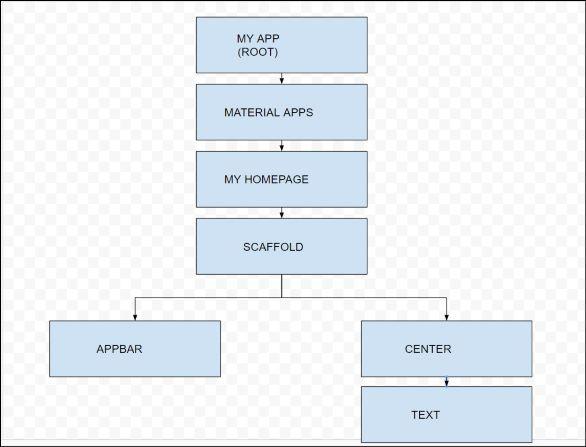
WIDGET
Description of the widgets used are as follows:
- Scaffold – Implements the basic material design visual layout structure.
- App-Bar – To create a bar at the top of the screen.
- Text – To write anything on the screen.
- Container – To contain any widget.
- Center – To provide center alignment to other widgets.
Stateful Widget
A Stateful Widget has state information. It contains mainly two classes: the state object and the widget. It is dynamic because it can change the inner data during the widget lifetime. This widget does not have a build() method. It has createState() method, which returns a class that extends the Flutters State Class. The examples of the StatefulWidget are Checkbox, Radio, Slider, InkWell, Form, and TextField.
class Car extends StatefulWidget {
  const Car({ Key key, this.title }) : super(key: key);

  @override
  _CarState createState() => _CarState();
}

class _CarState extends State<Car> {
  @override
  Widget build(BuildContext context) {
    return Container(
      color: const Color(0xFEEFE),
           child: Container(
            child: Container( //child: Container() )
        )
    );
  }
}
Stateless Widget
The Stateless Widget does not have any state information. It remains static throughout its lifecycle. The examples of the Stateless Widget are Text, Row, Column, Container, etc.
class MyStatelessCarWidget extends StatelessWidget {
  const MyStatelessCarWidget ({ Key key }) : super(key: key);

  @override
  Widget build(BuildContext context) {
    return Container(color: const Color(0x0xFEEFE));
  }
} 