$100 Website Offer

Get your personal website + domain for just $100.

Limited Time Offer!

Claim Your Website Now

YouTube Video Downloader Tools

I’m going to learn how to use the WizBrand Developers Team’s tools for downloading YouTube videos in this tutorial.

Why Use YouTube Video Downloader Tools?

There are many advantages to using a YouTube video downloading application. First of all, it enables offline video viewing, which is helpful when there is no reliable internet connection available. Second, you have the option to save videos for later viewing at your convenience. Finally, it gives you greater control over your viewing experience by allowing you to download videos in a variety of formats and quality levels.

Advantages of Using YouTube Video Downloader Tools

Downloading videos from YouTube can offer various benefits, including:

  • Convenience and Accessibility
  • Offline Viewing
  • Video Preservation

How to use YouTube Video Downloader Tools?

1st step:- open this tools-> WizBrand Tools
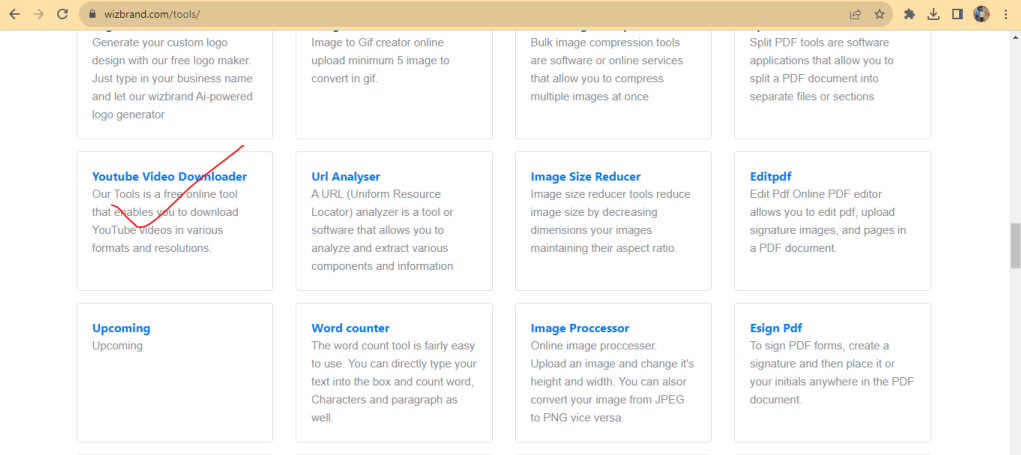
Step 2:Input YouTube Url
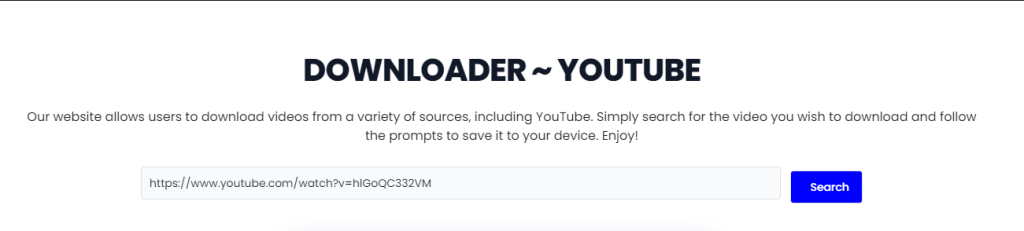
Step 3:Download

There are important Links

  • https://www.wizbrand.com/tools/
  • https://www.wizbrand.com/tools/password-generator/

Related Posts

Exploring Dining Options Made Simple: How to Discover Restaurants and Connect with Venues

Introduction Deciding where to eat can sometimes feel surprisingly difficult. Whether you are looking for a quick lunch during a busy workday, planning a celebratory family dinner,…

Read More

Elevate Your Daily Research and Industry Insights With a Smart AI News Aggregator

Introduction Following the news today can feel like standing in the middle of a busy railway station while dozens of announcers shout different updates at the exact…

Read More

Website Contact Page Design: Best Practices for Usability, Trust, and Conversions

Introduction A website contact page is often the final destination before a prospect decides whether to do business with you. Potential buyers navigate through your service pages,…

Read More

Smart Travel Connectivity: How to Evaluate Data, Networks, and Roaming Plans

Introduction Stepping off an international flight without internet access creates immediate hurdles. Modern travelers depend on connected phones to hail airport rides, check digital boarding passes, navigate…

Read More

Mautic vs listmonk vs Dittofeed — Complete Self-Hosted Marketing Automation Comparison

For your requirements—automatic lead capture, centralized contacts, segmentation, Amazon SES, WhatsApp bulk campaigns, automated follow-ups, low operating costs, and complete data ownership—Mautic is my first recommendation. However,…

Read More

Global Mobile Network Identifiers: A Practical Guide to Telecom Codes and Provider Records

Introduction Every time a mobile phone connects to a cellular tower, a quiet digital handshake takes place. Whether a smartphone is roaming in a foreign airport, an…

Read More
Subscribe
Notify of
guest
0 Comments
Oldest
Newest Most Voted
0
Would love your thoughts, please comment.x
()
x